AVIF Compressor
Compress AVIF images online while keeping sharp image quality and smaller file sizes.
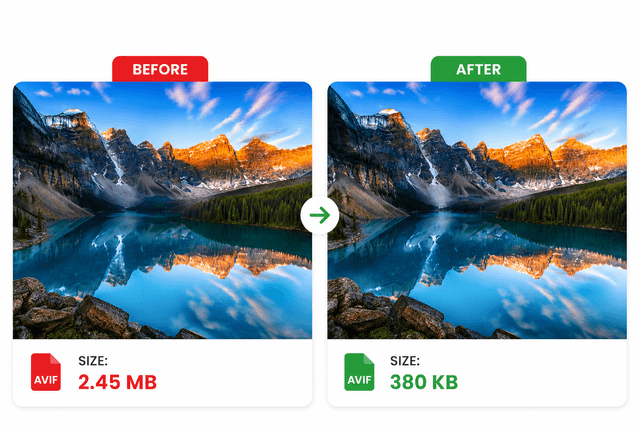
AVIF is the next-gen format for high-performance websites. Our AVIF Compressor reduces file size fast while preserving sharpness and visual clarity. 100% free, secure, and no watermark.

Drop AVIF to Compress
or click to choose from gallery
Elevate Your Productivity
Don't stop here. Explore our suite of AI-powered tools designed to simplify your digital life.
Compress AVIF Images Without Losing Quality
AVIF is a modern next-generation image format designed for high compression efficiency and faster website performance. Large AVIF files can still slow websites, increase bandwidth usage, and affect mobile loading speed if they are not optimized properly.
ImagZilla AVIF Compressor helps users reduce AVIF image size while preserving image sharpness, colors, and visual clarity. The tool works directly in the browser without software installation, signup, or watermarks.
Why Compress AVIF Images?
- ✓ Improve website loading speed
- ✓ Reduce AVIF image size quickly
- ✓ Improve Core Web Vitals performance
- ✓ Optimize images for mobile devices
- ✓ Reduce bandwidth usage
- ✓ Improve SEO and user experience
- ✓ Create lightweight next-generation images
Trusted Browser-Based Compression
- ✓ 100% free AVIF compression
- ✓ No signup required
- ✓ No watermark added
- ✓ Secure image processing
- ✓ Fast optimization workflow
- ✓ Instant downloads
What Is an AVIF Compressor?
An AVIF compressor is an image optimization tool that reduces AVIF image file size while preserving high image quality. AVIF uses advanced image compression technology that creates smaller image sizes compared to traditional formats like JPG and PNG.
Compressed AVIF images help websites load faster, improve mobile browsing performance, and reduce storage usage across devices.
How to Compress AVIF Images Online
Upload Your AVIF Image
Choose and upload your AVIF image from your device.
Automatic AVIF Optimization
The compressor automatically reduces unnecessary image data while maintaining image detail and clarity.
Download the Optimized Image
Preview and instantly download the compressed AVIF image.
Real AVIF Compression Results
| Image Type | Original Size | Compressed Size | Reduction |
|---|---|---|---|
| Ecommerce Product Image | 8.6 MB | 2.1 MB | 75% Smaller |
| Website Banner | 12.4 MB | 3.5 MB | 72% Smaller |
| Blog Featured Image | 5.3 MB | 1.2 MB | 77% Smaller |
These optimized AVIF images help websites load faster while maintaining excellent image quality.
Can AVIF Compression Reduce File Size Without Losing Quality?
Yes. AVIF compression technology is designed to create smaller image files while maintaining excellent visual quality and sharpness.
Most AVIF images can be reduced by 40% to 80% depending on:
- • image dimensions
- • image detail levels
- • compression settings
- • color complexity
- • file structure
AVIF often provides better compression efficiency than JPG, PNG, and WEBP formats.
Why Large Images Slow Websites
Large image files increase page weight and bandwidth usage. Heavy images can:
- slow mobile loading speed
- reduce user engagement
- increase bounce rates
- affect Core Web Vitals
- create poor browsing experiences
Compressing AVIF images before publishing them online helps improve page speed, SEO performance, and website usability.
Website owners improving image performance often also optimize PNG, JPG, and WEBP images using related ImagZilla compression tools.
AVIF vs WEBP – Which Format Is Better?
| Feature | AVIF | WEBP |
|---|---|---|
| Compression Efficiency | Better | Good |
| File Size | Smaller | Small |
| Image Quality | Higher | High |
| Website Performance | Excellent | Excellent |
| Browser Support | Growing | Excellent |
| Modern Optimization | Advanced | Strong |
AVIF is often preferred for modern websites focused on maximum image quality and better compression efficiency.
Best Ways to Reduce AVIF File Size
Resize Large Images
Reducing image dimensions significantly lowers AVIF file size.
Compress Images Before Uploading
Optimizing AVIF images before publishing improves website speed and SEO performance.
Use Modern Image Optimization
Combining AVIF compression with tools like Image Converter and Image Enhancer improves both image quality and performance.
Optimize Images for Mobile Devices
Smaller AVIF images improve mobile browsing speed and reduce data usage.
Use Balanced Compression Levels
Proper compression settings help preserve image quality while reducing storage usage.
Why Users Choose ImagZilla AVIF Compressor
Fast Browser-Based Compression
Compress AVIF images online directly inside the browser.
High-Quality Image Optimization
Reduce file size while preserving image sharpness and detail.
No Watermark Added
Compressed AVIF images remain clean and professional.
No Signup Required
Upload, compress, and download instantly.
Secure File Processing
Uploaded files are securely processed and automatically removed after compression.
Mobile-Friendly Workflow
Compress AVIF images on Android, iPhone, Windows, Mac, Linux, and tablets.
Optimized for Modern Websites
ImagZilla AVIF Compressor helps websites deliver lightweight next-generation images for faster browsing experiences.
AVIF Compression for SEO and Website Performance
Modern image optimization plays an important role in SEO and user experience. Optimized AVIF images help:
- improve page speed
- improve mobile usability
- reduce bandwidth usage
- improve Core Web Vitals
- improve crawl efficiency
- improve user engagement
Smaller AVIF image files help websites create faster-loading pages across desktop and mobile devices.
Many websites combine AVIF optimization with related tools like WEBP Compressor, JPG Compressor, and Image Resizer to improve image performance across multiple formats.
Best Use Cases for AVIF Compression
| Use Case | Benefit |
|---|---|
| Websites & Blogs | Faster image loading |
| Ecommerce Stores | Lightweight product images |
| Landing Pages | Better page performance |
| Mobile Websites | Reduced bandwidth usage |
| SEO Optimization | Improved Core Web Vitals |
| Modern Web Apps | Smaller next-generation images |
Common AVIF Compression Problems and Solutions
| Problem | Solution |
|---|---|
| AVIF file too large | Compress AVIF image online |
| Website loading slowly | Optimize heavy images |
| Mobile pages feel slow | Reduce image dimensions |
| Poor upload performance | Create lightweight AVIF images |
| Large product images | Compress before publishing |
| Storage usage increasing | Reduce unnecessary image data |
Best Practices for Optimizing AVIF Images
Use Proper Image Dimensions
Avoid uploading unnecessarily large images.
Optimize Images Before Publishing
Compress images before adding them to websites or blogs.
Use AVIF for Modern Websites
AVIF often provides better compression efficiency than traditional image formats.
Combine Multiple Image Optimization Methods
Optimizing JPG, PNG, WEBP, and AVIF images together improves overall website performance.
Use Lightweight Images Across Mobile Pages
Smaller optimized images improve mobile browsing speed and user experience.
Features of the Online AVIF Compressor
- • Compress AVIF images online
- • Reduce AVIF image size fast
- • Browser-based optimization
- • High-quality image compression
- • Secure file processing
- • No signup required
- • No watermark added
- • Mobile-friendly compressor
- • Instant downloads
- • Lightweight next-generation image optimization
Image Optimization Statistics
| Optimization Method | Average File Reduction |
|---|---|
| AVIF Compression | 40%–80% |
| Image Resizing | 20%–70% |
| Metadata Removal | 5%–15% |
| Modern Format Optimization | 30%–60% |
Developers, bloggers, marketers, and website owners often reference these optimization methods when improving website speed and Core Web Vitals.
Related Image Tools
Frequently Asked Questions
Is this AVIF Compressor free to use?
Yes, users can compress AVIF images online for 100% free.
Can I compress AVIF images without losing quality?
Yes, the compressor reduces file size while maintaining balanced image quality.
Does AVIF compression improve website speed?
Yes, optimized AVIF images reduce page weight and improve loading performance.
Is software installation required?
No, the tool works directly inside the browser.
Are uploaded AVIF images secure?
Yes, uploaded files are securely processed and automatically removed after compression.
Can I use the AVIF Compressor on mobile devices?
Yes, the tool works on Android, iPhone, tablets, Windows, and Mac devices.
Is AVIF better than WEBP?
AVIF often provides smaller file sizes and higher image quality compared to WEBP.
Why should I optimize AVIF images before uploading them online?
Optimized images improve website speed, user experience, and SEO performance.
Compress AVIF Images Now
Reduce AVIF image size online for 100% free using ImagZilla’s browser-based AVIF optimization tool. Upload your AVIF image, compress it instantly, and download a lightweight next-generation image optimized for websites, blogs, ecommerce stores, mobile apps, and faster loading pages.